“Why 95% of Your Website Visitors Leave Without Buying (And How to Fix It)”
Imagine this: You’re driving 1,000 visitors a month to your online store. But only 20 people buy. That means your conversion rate is just 2%—far below the 3–5% industry average.
For every 100 people who leave without buying, you’re losing thousands in potential revenue.
But here’s the good news: Small tweaks can double (or triple) your conversions.
In this guide, you’ll learn:
✔️ What conversion rate really means (and why it’s a make-or-break metric).
✔️ How to calculate yours (free calculator included).
✔️ Proven fixes if your rate is too low.
Let’s dive in.
What Is a Conversion Rate?
A conversion rate measures the percentage of visitors who complete a desired action, such as:
- Making a purchase
- Signing up for a newsletter
- Downloading an ebook
- Booking a consultation
Conversion Rate Formula
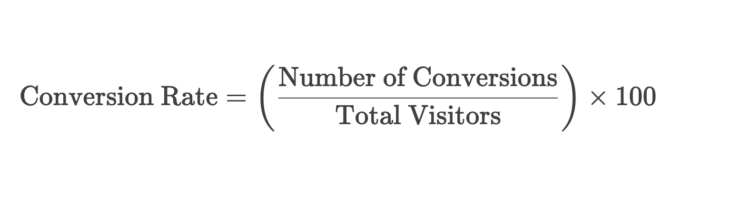
Example:
- Conversions (purchases): 50
- Total visitors: 2,000
- Conversion Rate: ( (50 / 2000) \times 100 = 2.5\% )
What’s a Good Conversion Rate?
| Industry | Average Conversion Rate | Top Performers |
|---|---|---|
| Ecommerce | 2–3% | 5%+ |
| SaaS | 3–5% | 7%+ |
| Lead Generation | 5–10% | 15%+ |
| Blog (Email Opt-ins) | 1–3% | 5%+ |
Note: A “good” rate depends on your niche, traffic source, and offer.
Free Conversion Rate Calculator
Try it yourself:
Free Conversion Rate Calculator
If your rate is below industry average, keep reading.
6 Reasons Your Conversion Rate Sucks (And How to Fix It)
1. Weak Headlines
❌ Problem: "Buy Our Product" (generic).
✅ Fix: Use benefit-driven headlines like "Get Whiter Teeth in 7 Days—Guaranteed."
2. Poor Mobile Experience
❌ Problem: Buttons too small, slow load times.
✅ Fix: Test your site on Google’s Mobile-Friendly Test.
3. No Social Proof
❌ Problem: Zero reviews or testimonials.
✅ Fix: Add customer photos, ratings, and case studies.
4. Complicated Checkout
❌ Problem: 5-step forms with unnecessary fields.
✅ Fix: Reduce to 1–2 steps (or offer guest checkout).
5. Unclear Call-to-Action (CTA)
❌ Problem: "Click Here" (vague).
✅ Fix: Try "Get My Free Trial Now" (specific + urgent).
6. Price/Objection Barriers
❌ Problem: No free shipping, hidden fees.
✅ Fix: Offer free returns, money-back guarantees, or payment plans.
Advanced Conversion Rate Optimization (CRO) Tactics
A/B Testing
- Test two versions of a page (e.g., different CTAs, colors, layouts).
- Use Google Optimize (free) or Unbounce (paid).
Exit-Intent Popups
- Offer a discount or freebie when users try to leave.
- Tools: OptinMonster, Privy.
Urgency & Scarcity
- "Only 3 left in stock!"
- "Sale ends in 2 hours!"
Case Study: How Nerd Fitness Increased Conversions by 200%
- Problem: Low opt-in rates for their fitness guide.
- Solution: Changed their CTA from "Download Now" to "Get Your Free Guide (Before It’s Gone!)"
- Result: Conversions tripled in 30 days.
Tools to Improve Conversion Rates
| Tool | Best For | Cost |
|---|---|---|
| Hotjar | Heatmaps & user recordings | Free–$99/month |
| Google Optimize | A/B testing | Free |
| OptinMonster | Popups & lead capture | $9–$49/month |
Final Tip: Track, Test, Repeat
Improving conversions is not a one-time fix. The most successful businesses:
✔️ Continuously test (even small changes matter).
✔️ Analyze drop-off points (Google Analytics > Behavior Flow).
✔️ Listen to customer feedback (surveys, reviews).
Found this helpful? Share it with a business owner who needs more sales! 🚀